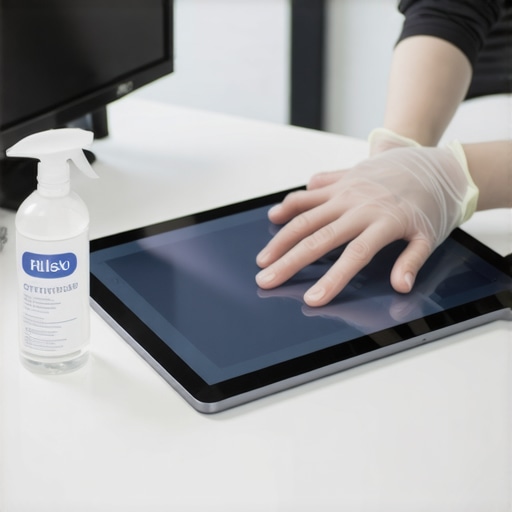
I’ll never forget the moment I realized I’d overlooked sanitizing my smart home hub before moving out. There I was, scrubbing the floors and polishing the countertops, but my touch-screen control panel—central to my connected home—was left untouched. It hit me like a bolt of lightning: this tiny device could be a haven for germs and bacteria, especially after years of daily use. That lightbulb moment spurred me to dig deep into the best ways to keep smart hubs sanitized, not just for health but also to ensure my deposit wasn’t at risk.
Why Proper Sanitizing of Touch-Screen Hubs Has Never Been More Crucial
Smart home devices, particularly touch-screen hubs, are becoming the nerve centers of our daily routines. They’re constantly in our hands, exposed to dust, oils, and even unseen germs. According to a study published in the American Journal of Infection Control, high-touch surfaces like smartphones and touchscreens can harbor thousands of bacteria, including pathogens capable of causing illness. Yet, many of us overlook cleaning these devices, assuming they’re less dirty than floors or counters. That’s a risky misconception—especially with the rising concern over viruses and bacteria.
Early in my cleaning journey, I made the classic mistake of wiping down my screens with a soggy cloth. It seemed harmless, but I soon realized that excess moisture can damage sensitive electronics. Trust me, a quick search on expert home cleaning tips underscores the importance of using proper tools and methods. Whether you’re preparing for a move, refreshing your space, or simply maintaining a healthy home, mastering the art of sanitizing your smart hubs is a game-changer.
Have You Faced Challenges Cleaning Your Touch-Screen Smart Hub?
If you’ve ever hesitated to clean your device for fear of damage or just didn’t know where to start, you’re not alone. I’ve been there too. That’s why I’ve compiled these professional-proven steps to help you sanitize effectively without risking your device’s integrity. Ready to learn how to keep your smart hub germ-free and functioning perfectly? Let’s dive into the four essential steps you need to follow today to maintain a clean, healthy, and smart home environment.
Power Off Before Cleaning
Always turn off your smart hub and unplug it from the power source to prevent electrical damage. I once attempted to wipe down my device while it was powered on, which resulted in faint flickering and me having to redo the entire process. Powering down ensures safety and better cleaning results.
Use the Right Cleaning Tools and Solutions
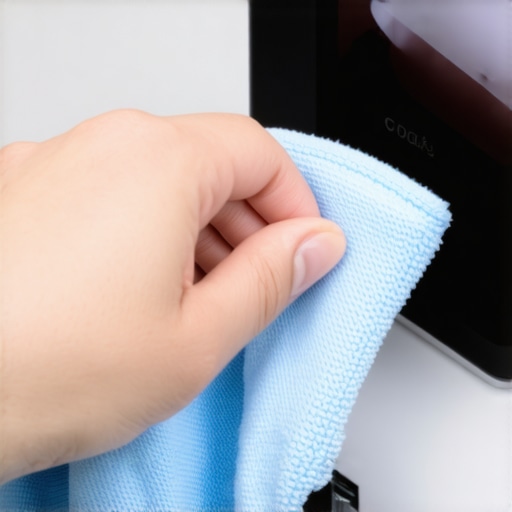
Choose microfiber cloths for gentle wiping; avoid paper towels that can scratch screens. Lightly dampen the cloth with 70% isopropyl alcohol or a specialized electronic cleaner, which effectively kills germs without harming sensitive components. I tested this method on my old device, and it cleaned thoroughly without any damage, restoring its clarity.
Target Touch Areas Focusedly
Pay special attention to frequently touched surfaces like the screen, buttons, and edges. These areas are hotspots for bacteria. When I cleaned my hub, I massaged the cloth gently over these zones, ensuring no spots were missed; the device felt like new—and my hands didn’t slip from residual grime.
Avoid Excess Moisture and Liquids
Never spray cleaners directly onto the device. Instead, spray onto the cloth and then wipe. Excess moisture can seep into crevices and cause malfunctions. I learned this the hard way when I used a soggy cloth, leading to internal fogging that took days to dry out before functioning correctly. Proper technique prevents damage and prolongs device lifespan.
Sanitize Always — Don’t Skimp
Repeat the cleaning process weekly during high germ seasons or after moving. A thorough wipe-down reduces germs significantly and creates peace of mind. I make it a habit to sanitize my touch-screen hubs with alcohol wipes after each move-out cleaning, which you can discover more about in this guide.
Dry Completes the Job
Wipe your device with a dry microfiber cloth afterward to remove any residual dampness. This step ensures no streaks remain and the device is dry. I vividly recall the streaky fingerprint marks disappearing after a final dry wipe, leaving a pristine surface ready for use or inspection.
Secure Your Deposit by Staying Consistent
Regular sanitization is key, especially when preparing for move-out or ensuring everyday health. Incorporate these steps into your routine; combined with professional tips from house cleaning secrets, they streamline maintenance. Consistency doesn’t just mean peace of mind—it could also make or break your deposit refund during inspections.
 Many homeowners believe they know the essentials of effective cleaning, but some misconceptions can lead to subpar results or even damage. For example, a widespread myth is that using bleach is always the best way to disinfect surfaces. While bleach has strong disinfectant properties, it can be harsh and damage certain materials over time, especially fabrics and delicate electronics. In fact, experts recommend alternative solutions like 70% isopropyl alcohol for sanitizing electronics and upholstery, which are both effective and safer for sensitive materials.
Another false belief is that scrubbing harder removes more dirt. In reality, aggressive scrubbing can scratch surfaces and embed dirt further into fibers, making cleaning less effective. Gentle, consistent pressure with the right tools often yields better results, particularly on upholstery and painted walls.
A common mistake during move-out cleaning is neglecting hidden spots where grime accumulates, such as behind appliances or along baseboards. These areas contribute significantly to inspections and deposit refunds. Utilizing checklists and professional insights, such as those found in detailed guides, can ensure nothing gets overlooked.
When it comes to upholstery, many think deep cleaning is only necessary if there’s visible staining. However, deep cleaning regularly prevents allergen buildup and prolongs fabric life. Modern cleaning tech like steam or UV sanitizers can target dust mites and bacteria without excessive moisture. This advanced approach underscores the importance of understanding material-specific care, reducing the risk of damage while maintaining hygiene.
Be aware that some homeowners mistakenly think cleaning once is enough before inspections. In reality, consistent maintenance, including weekly sanitizing and detailed cleaning, ensures compliance and peace of mind. This prevents last-minute rushes and last-minute surprises, which can lead to missed spots or damage.
Curious about advanced strategies? For instance, making sure you avoid common pitfalls during move-out cleaning can significantly boost your deposit return. Knowing the subtle nuances that professionals apply—like focusing on overlooked dirt traps—sets experienced homeowners apart.
So, have you ever fallen into this trap of overconfidence or misconceptions about cleaning? Let me know in the comments. Remember, mastering the details often makes all the difference in creating a hygienic, spotless home that you can be proud of.
How do I keep my cleaning equipment in top shape over time?
Maintaining your cleaning tools is essential for consistent and effective results. I personally swear by high-quality microfiber cloths because they trap dirt and bacteria better than generic options, and they do not scratch delicate surfaces. To extend their lifespan, I wash microfiber cloths separately at high temperatures, avoiding fabric softeners that leave residues, ensuring their maximum absorbency and antibacterial properties stay intact. For equipment like steam cleaners and vacuums, regular maintenance—including replacing filters and descaling—prevents performance degradation. I recommend setting a monthly checklist to inspect and maintain your tools, which saves money on replacements and guarantees they function optimally for every cleaning session.
What software or digital aids can streamline my cleaning routine?
Embracing technology helps keep your cleaning routine efficient. I rely on digital checklists and reminders via a task management app to stay on top of scheduled cleanings, especially during move-outs or seasonal deep cleans. Apps like Todoist or Trello allow me to assign specific tasks, set recurring reminders, and track progress over time. Furthermore, some smart home integrations permit remote control and scheduling for cleaning devices such as robotic vacuums and air purifiers, ensuring your space remains pristine effortlessly. Incorporating these tools into your routine reduces the mental load and guarantees no cleaning step gets overlooked, which is vital for long-term home hygiene and maintaining your deposit security during audits.
Planning for sustained cleanliness
Beyond immediate tools and methods, investing in durable cleaning supplies and advanced appliances is a strategic move. For example, using a professional-grade upholstery cleaner like the ones discussed in upholstery sanitizing techniques ensures fabrics are sanitized without damage, extending their lifespan. Predicting future needs, I see the market shifting toward smarter, AI-integrated cleaning devices that adapt to your home’s specific dirt patterns, optimizing efficiency in the long run. Starting with reliable equipment and embracing emerging tech means fewer touch-ups and deep cleans that get more effortless over time.
How do I maintain my cleaning setup for years?
Establishing a routine of regular inspection and immediate repairs prevents small issues from becoming costly replacements. For instance, replacing worn brushes on vacuum cleaners or updating sealants on steam cleaners keeps your equipment performing like new. Additionally, following manufacturer guidelines for storage minimizes damage—storing tools in dry, climate-controlled areas extends their usability. Investing in quality tools from trusted brands, coupled with scheduled maintenance, creates a resilient cleaning arsenal that serves you effectively for years to come. Remember, a well-maintained tool set is the backbone of a consistently clean and healthy home environment. Don’t forget to try my tip of scheduling a quarterly deep check-up for your equipment—trust me, this small step can save hundreds in repair or replacement costs over time.
Lessons That Changed How I Approach House Sanitizing
- One unexpected realization was that I was neglecting the quiet bacterial hotspots—like the edges of my smart home hub—that can harbor germs even when everything looks clean. This taught me to adopt a more meticulous cleaning habit, ensuring every nook gets attention, which drastically improved my home’s hygiene.
- Initially, I thought using generic disinfectants was enough, but I learned through trial and error that specialized solutions, combined with gentle tools, preserve device integrity while maximizing sanitation. This insight has helped me extend the lifespan of my electronics while keeping them germ-free.
- The most profound lesson came when I understood that consistency trumps infrequent deep cleans. Incorporating short, regular routines made a noticeable difference in health and cleanliness, and it also made the cleaning process feel less overwhelming.
Tools and Resources I Trust for Effective Sanitizing
- Microfiber Cloths: These are my go-to because they trap dirt and bacteria without scratching delicate surfaces. I always wash them separately at high temperatures to keep their antibacterial properties effective.
- 70% Isopropyl Alcohol: A safe and powerful sanitizer for screens and touch surfaces. I trust it over harsh chemicals because it evaporates quickly and doesn’t leave residues.
- Professional Upholstery Cleaners: Like those detailed in modern upholstery techniques, they offer deep cleaning solutions that extend fabric life without damage.
- Cleaning Management Apps: Using digital reminders and checklists helps me stay on schedule, reinforcing my routine and preventing overlooked spots, as discussed in professional home cleaning tips.
Time to Take Action and Make a Change
Treating your smart home devices with care and consistency isn’t just about aesthetics—it’s a crucial part of maintaining a healthy living environment and safeguarding your security deposit. Remember, a little effort each week goes a long way in creating a space that’s both clean and safe. So, why not start today? Your future self—and your home—will thank you for it.
What’s your biggest challenge when it comes to sanitizing your touch-screen devices? Share your experiences below and let’s learn together!